This document outlines the steps for managing a patient's treatment status, including discharging, placing treatment on hold, and readmitting the patient.
Permissions Required
No specific BestNotes permissions are required.
Managing Patient Treatment Status
Discharging or Placing a Patient on Hold
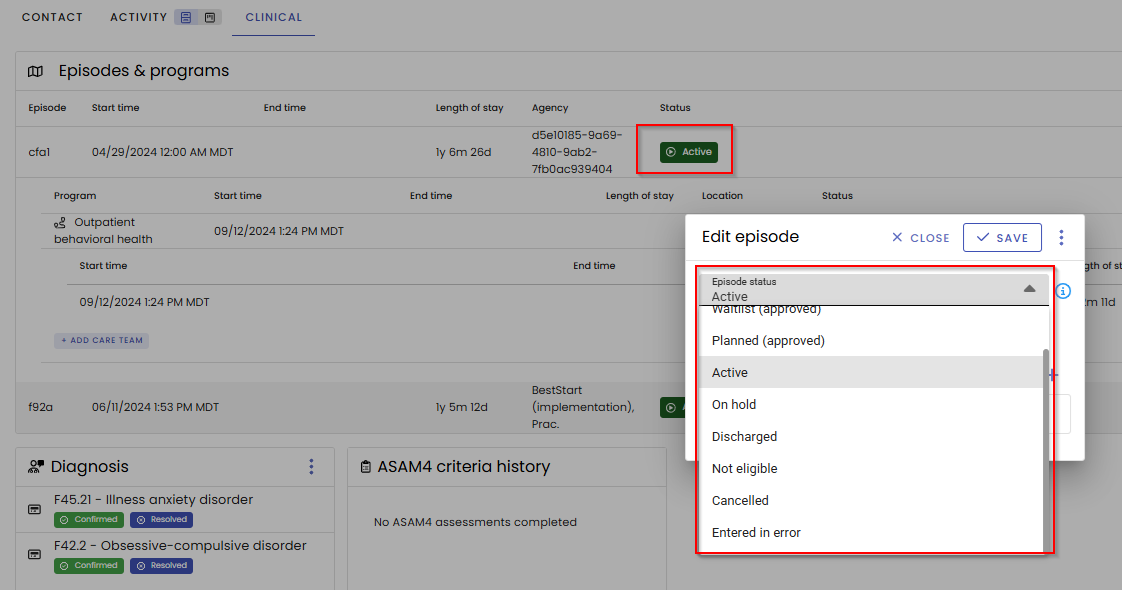
Discharging removes the patient from active treatment, while placing them on hold temporarily pauses their treatment timeline.
Navigate to the patient chart and click on the Clinical tab.
- Discharging: The discharge process can be performed at the episode level or the program level, depending on the extent of the cessation of care.
- Holding Treatment: If a patient requires a pause in treatment (e.g., due to a hospital stay or similar event), the ability exists to place the patient on hold. This action suspends the calculation of the patient's length of stay.
Re-admitting a Patient
To resume treatment for a patient who has been discharged:
- Open the patient's currently inactive chart.
- Navigate to the Clinical tab.
- Select the plus (+) icon located to the right of the Episode label. This action creates a new treatment episode.

Note on Reactivation: If the patient has been discharged for less than 30 days, re-activation of the previous episode may be possible. This determination is at the discretion of the provider based on internal standards and protocols.
Back to top of page