BestNotes has partnered with Perspectives Health to provide an AI solution that references the patient’s existing notes, diagnoses, and history when generating documentation.
Perspectives AI is only available with the BestNotes Fresh product and can be accessed after downloading the Perspectives AI extension.
Granting User Access to Perspectives AI
To turn on Perspectives AI in Fresh, navigate to Settings > Security >Permission Groups. Assign Perspectives AI access to a new or existing permission group. You will find this permission under the User settings category. Click on the box titled "Access Perspectives AI" and Save. Toggle over to the Associated Users tab and add desired users to the group.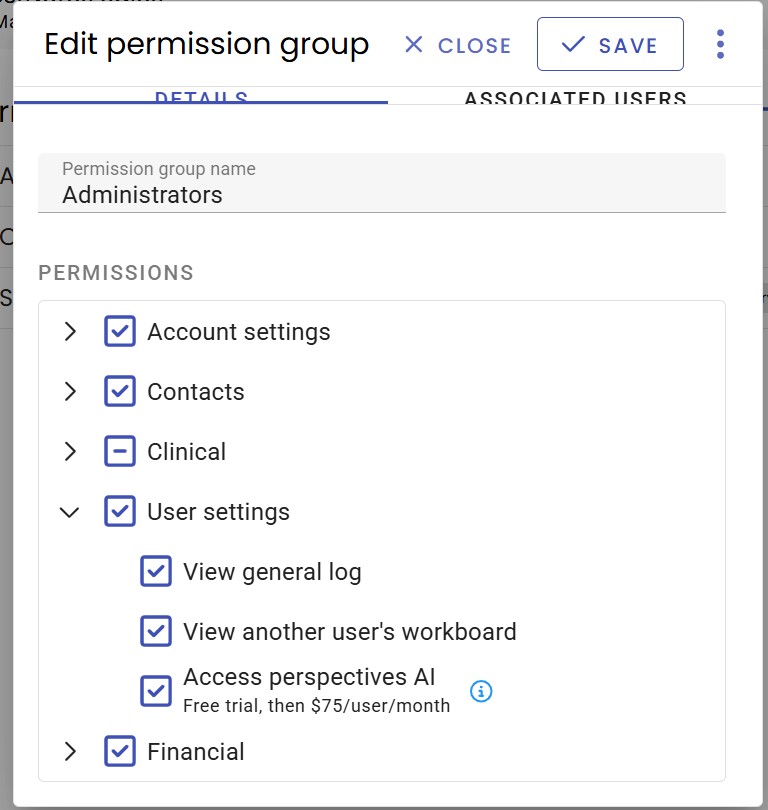
This setting provides access to Perspectives AI features, AI form filling, and AI chat and requires a chromium web browser.
This guide is a step-by-step walk through on how to set up and use Perspectives AI. Perspectives Guide
Once Perspectives AI is enabled, please contact our team for extra training, if needed: team@bestnotes.com